AI risk assessment tool: a free template, the best toolkits, and how to choose one
If you searched for an “AI risk assessment tool,” you want something you can actually use — so let's start there. This guide gives you a free, ready-to-use AI risk assessment template to download, then compares the best free toolkits, explains the difference between templates and AI-powered tools, and shows how to run one — including for generative AI. Part of our guide to AI risk assessment.
AramGRC Team·AI Risk & Assurance·September 12, 2026·11 min read
Download the free AI risk assessment tool (Excel)
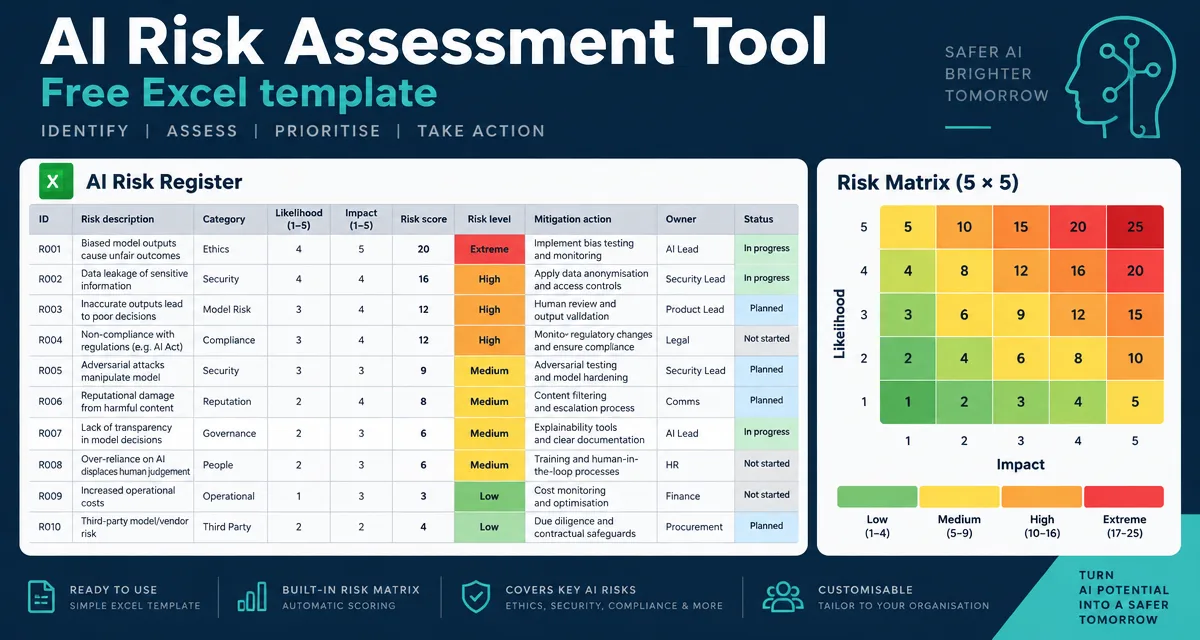
Here's the tool — a free AI risk assessment template as an Excel workbook. Download it, fill in the white cells, and your inherent and residual risk scores calculate automatically.
A Read me tab — how to use it and the scoring key.
An AI System Inventory — one row per AI system, so you know what you're assessing.
A Risk Register — the core tool: score Likelihood and Impact 1–5 and it computes inherent and residual risk ratings (Low / Medium / High / Critical) for you, with dropdowns and six worked example rows.
A Scoring Key — the likelihood, impact and rating bands explained.
It opens in Excel, Google Sheets or LibreOffice, and you can save it as a PDF for a report or paste the register into slides for a board readout. Prefer to understand the structure before you fill it in? See our companion AI risk assessment template guide, which walks through every column.
What is an AI risk assessment tool?
“AI risk assessment tool” means two different things, and it's worth being clear which you need:
A template or toolkit — a structured document (usually a spreadsheet) that guides a human through identifying, scoring and treating AI risks. The template above is one of these. So are the ICO and Microsoft toolkits below.
An AI-powered platform — software that automates parts of the job: discovering AI systems, monitoring models, flagging bias or drift, and generating evidence. These are often searched as “AI-based,” “AI-powered” or “AI-driven” risk assessment tools.
Most teams start with a template — it's free, it forces the right conversations, and it produces an auditable record — and adopt a platform later as their number of AI systems grows. We compare the two below.
The best free AI risk assessment toolkits
You don't have to build from scratch. These free, credible toolkits are worth knowing — several are effectively ready-made tools in their own right:
Toolkit
Publisher
Format
Best for
ICO AI and data protection risk toolkit
UK ICO
Excel spreadsheet
UK/GDPR data-protection risk in AI
Responsible AI Impact Assessment Template
Microsoft
Word template + guide
Structured impact assessment for any AI system
AI RMF + Playbook
NIST
Framework + web playbook
A US-standard backbone (Govern/Map/Measure/Manage)
ISO/IEC 42005
ISO/IEC
Paid standard
AI system impact assessment guidance
Algorithmic Impact Assessment
Govt. of Canada
Online questionnaire
Public-sector automated decision systems
AramGRC AI Risk Assessment Template
AramGRC
Excel (free, above)
A quick, auto-scoring risk register mapped to NIST/ISO/EU/DPDP
A note on the ICO toolkit specifically (it's a common search): it's an excellent, free Excel resource, but it's framed around UK data-protection law. If you operate in India, you'll want the same discipline mapped to the DPDP Act — which our template and our team do.
Template formats: Excel, Word, PDF, PPT — which to use
People search for this tool in every format. Here's the honest answer on which to use for what:
Excel (or Google Sheets) — the right home for the live risk register, because it scores and sorts. That's what our template is.
Word or PDF — best for the write-up: the assessment report you circulate or file. Export from the register when you need a document.
PowerPoint — for the board or steering-committee readout: the heatmap and the top five risks, not the full register.
So you rarely need separate “Excel vs Word vs PDF” tools — you need one register and the ability to export. Start with the Excel template above.
AI-powered tools vs. templates — and “risk assessment generators”
As your AI estate grows, a template hits limits: it can't discover shadow AI, monitor a model in production, or keep itself current. That's where AI-powered governance platforms come in — they automate discovery, testing and monitoring. Some tools now even act as a “risk assessment generator,” drafting a first-pass assessment from a description of your system.
Our take: a generator or platform is a force-multiplier, not a substitute for judgment. The output still needs a human who understands your business context to be trustworthy. Use a template to learn the discipline, then layer automation on top. This sits inside the broader discipline of AI risk management and AI governance.
Generative AI risk assessment: what's different
Generative and agentic AI add risks a classic model assessment misses, so give them their own rows in the register:
Prompt injection and jailbreaks — attackers manipulating the model through its inputs.
Hallucination — confident, wrong output presented as fact.
Data leakage — the model revealing training data, retrieved documents or system prompts.
IP and copyright — generated content that infringes, or training data you had no right to use.
Excessive agency — an agent taking actions beyond what it should.
A spreadsheet standardises how you record risk; a framework standardises how you think about it. Point the tool at a recognised framework so your results are defensible: the AI risk assessment framework guide shows how this maps to the NIST AI RMF, ISO 42001 and the EU AI Act. For risk you buy in from vendors, use the AI vendor risk assessment approach.
How AramGRC helps
The free template gets you started; a defensible programme is the goal. AramGRC runs AI risk assessments mapped to the NIST AI RMF, ISO/IEC 42001, the EU AI Act and India's DPDP Act, stands up a repeatable process, and turns findings into a prioritised remediation plan — so your assessment holds up with regulators and buyers, not just internally.
Frequently asked questions
Is there a free AI risk assessment tool?+
Yes — this page includes a free AI risk assessment template (Excel) you can download and use immediately, with an auto-scoring risk register. Other free toolkits include the UK ICO AI and data protection risk toolkit and Microsoft's Responsible AI Impact Assessment template.
What is the best AI risk assessment tool?+
It depends on your context. For a fast, free start, use a spreadsheet template mapped to a recognised framework. For UK data-protection focus, the ICO toolkit is strong; for a US-standard backbone, the NIST AI RMF; as your AI estate grows, an AI governance platform adds automated discovery and monitoring.
Is there an AI risk assessment tool in Excel?+
Yes — the AramGRC template on this page is an Excel workbook with an inventory, an auto-scoring risk register and a scoring key. It also opens in Google Sheets and LibreOffice.
What is the ICO AI risk assessment toolkit?+
A free Excel toolkit from the UK Information Commissioner's Office that helps organisations assess and mitigate data-protection risks in AI. It's framed around UK GDPR; if you operate in India, map the same approach to the DPDP Act.
How do you assess generative AI risk?+
Add generative-specific risks to your register — prompt injection, hallucination, data leakage, IP and excessive agency — and test for them with red-teaming, not just a questionnaire.
Are AI-powered risk assessment tools reliable?+
They're useful for automating discovery, monitoring and first drafts, but their output still needs review by someone who understands your business context. Treat them as a force-multiplier, not a replacement for judgment.